AI Translation Notice
This document is automatically translated by AI. If you can read Chinese, we recommend checking the original Chinese documentation for more accurate information.
Notification
After tasks are completed, the script can report task execution status through email or API.
Email Notification
TIP
Please check the Whether enable email notification, default using QQ email option to enable this feature.
Using QQ Mail for Notification
Enter your QQ number in the Email Account field.
Enter your QQ mail's authorization code in the Email SMTP token field.
How to get QQ mail authorization code?
- Open QQ Mail Web Version, log in to your account, and select Settings in the upper right corner.
- In the settings page, find Settings -> Account and Security -> Security Settings.
- Find
POP3/IMAP/SMTP/Exchange/CardDAV Serviceand select Enable Service. - You may need to send a verification code, please follow the instructions in the email.
- You will then receive a string of keys, fill it in the
Email SMTP tokenconfiguration field.
Using Other Email for Notification
TIP
Please check the Advanced Email Configuration option to enable this feature.
Enter your email in the
Email Accountfield.Enter the sender's email in the
Sender Emailfield.Enter the recipient's email in the
Receiver Emailfield.Enter your email's authorization code in the
Email SMTP tokenfield.- The method of obtaining authorization codes for most email services is similar. Refer to the QQ mail method above or search online for the specific method for your email service.
Enter your email's SMTP server address in the
SMTP Serverfield.- Common Email SMTP Server Addresses
| # | SMTP Server | |
|---|---|---|
| 1 | QQ Mail | smtp.qq.com |
| 2 | NetEase 163 Mail | smtp.163.com |
| 3 | NetEase 126 Mail | smtp.126.com |
| 4 | Outlook Mail | smtp-mail.outlook.com |
| 5 | Google Gmail | smtp.gmail.com |
| 6 | China Mobile 139 Mail | smtp.139.com |
- Can't find your email? Please search online for your SMTP server address.
API Notification
TIP
Please check the API Notification option to enable this feature.
You can use API to get notifications, which can be used to push to messaging services such as Telegram, Discord, etc. This requires some third-party services, please look it up on the internet yourself.
- Enter your API address in the
API Notification URLfield.
📝 Note: You can click the
PUSHPLUS,SERVERCHANorTELEGRAM BOTbuttons below the API address tab to automatically add the API addresses for PushPlus, ServerChan or Telegram Bot.
The API address needs to specify the format for Token, title and content, with keywords [token], [title], [content].
Example with ServerChan
ServerChan's API address is:
https://sctapi.ftqq.com/<Token>.send?title=<Title>&desp=<Content>Therefore, enter in the API Notification URL (GET request) field:
https://sctapi.ftqq.com/[token].send?title=[title]&desp=[content]- Enter your API's Token in the
API Notification Tokenfield.
📝 Note: The method of obtaining Tokens for different notification APIs varies, please look it up according to the service you use.
Custom Notification Content
You can modify notification content by customizing it.
In the Customize the email content field, you can fill in the following fields to flexibly control notification content.
| # | Field | Description | Result |
|---|---|---|---|
| 1 | %PORT_IS_USED% | Whether target port is occupied | True/False |
| 2 | %EMULATOR_PROCESS_PID% | PID of emulator process | Process ID number or None |
| 3 | %GUI_OPEN_IN_WEB% | Whether GUI is opened in web | True/False |
| 4 | %LAST_TEAM_SET% | Last team information | List |
| 5 | %CAFE_HAD_INVITED% | Whether cafe students have been invited | True/False |
| 6 | %TIMETABLE_NO_TICKET% | Whether timetable has no ticket | True/False |
| 7 | %BAAH_START_TIME% | BAAH task start time | Time |
| 8 | %BEFORE_BAAH_SOURCES% | Resources before task start | AP, Credits and Pyroxene |
| 9 | %AFTER_BAAH_SOURCES% | Resources at task end | AP, Credits and Pyroxene |
| 10 | %CONTEST_NO_TICKET% | Whether contest has no ticket | True/False |
| 11 | %HAS_ENTER_EVENT% | Whether event page has been entered | True/False |
| 12 | %ASSAULT_DATE% | Total assault date | Date |
| 13 | %CRAFT_FAILED% | Craft failed | Reason |
| 14 | %EVENT_DATE% | Event date | Date |
| 15 | %SCREENSHOT_READ_FAIL_TIMES% | Number of screenshot read failures | Number |
| 16 | %RESTART_EMULATOR_TIMES% | Number of emulator restarts | Number |
| 17 | %SCREENSHOT_DATA% | Screenshot data | RGB value or None when screenshot mode is pipe |
| 18 | %CURRENT_PERIOD_TASK_INDEX% | Executed task sequence number | Number, -1 means no task has been executed |
Example
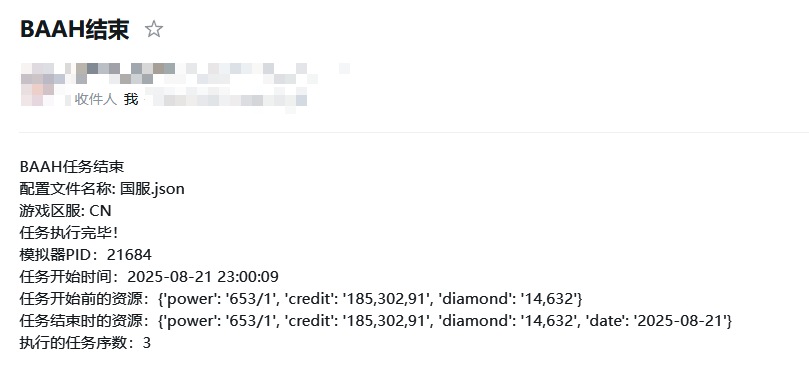
Input content:
Task execution completed!
Emulator PID: %EMULATOR_PROCESS_PID%
Task start time: %BAAH_START_TIME%
Resources before task start: %BEFORE_BAAH_SOURCES%
Resources at task end: %AFTER_BAAH_SOURCES%
Executed task sequence number: %CURRENT_PERIOD_TASK_INDEX%
Report content: